
Installing Ubuntu using windows PXE


ok first we need a Pxe server we will use TFTP server you can download it here
and then we need the netboot for ubuntu and that we can download from here :
or

1.ok install the program that is vary simple
2.and then creak a directory name it PXE on drive C:
3.then run the program and switch to the tab "DHCP Server" and fill in your network setup like that >>
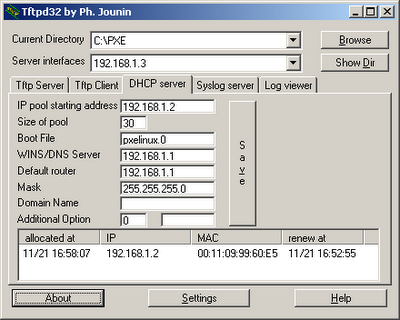
after that click save
4.Now we need to copy the Ubuntu netboot installer over to our PXE root directory
4.1unzip the file netboot
4.2 copy the folder ubuntu-installer to C:\PXE
4.3 copy the folder pxelinux.cfg from ubuntu-installer\i386\ to C:\PXE
4.4 copy the file pxelinux.0 from ubuntu-installer\i386\ to C:\PXE

at the end boot from tftp you may need to activate booting from the network interface in the BIOS

Good Luck


Comments

Popular posts from this blog

ESP32-C6 Wi-Fi Logger with Browser GPS + Heat Map Dashboard

This project is an ESP-IDF firmware for the Seeed Studio XIAO ESP32-C6 that turns the board into a self-hosted, secure Wi-Fi scanning logger. It creates its own access point, serves a responsive HTTPS web UI, logs nearby Wi-Fi access points, optionally tags rows with GPS coordinates (provided by the client browser), and exposes battery status from the on-board LiPo input. The end result is a pocket Wi-Fi “survey” tool: scan, track, export logs as CSV, and generate a heat map view to visualize RSSI vs location. Project overview and feature set: :contentReference[oaicite:1]{index=1} What it does AP + Station mode so the device can serve the dashboard while scanning nearby Wi-Fi networks. HTTPS web interface using a bundled certificate/key for local secure access. Single scan and continuous tracking modes. CSV export for analysis and archiving. Persistent logging to SPIFFS at /spiffs/logs.csv . Battery monitoring via ADC with voltage/percentage/status sh...

learn how to sniff wireless passwords with pirni

The thing about the iPod Touch and the iPhone is that they are great portable hacking devices. To the naked eye the iPod Touch/iPhone looks like nothing more than an ordinary mp3 player/cellphone however that is just an understatement to its full potential. Once your Ipod Touch/iPhone is jailbroken you have access to your whole file system meaning that applications generally associated with laptop/desktop hacking can be ported and used on the iPod Touch/iPhone. This opens up a whole lot of possibilities for network sniffing, port scanning and much much more! In this tutorial we are going to take a look at one of these programs called Pirni. What is Pirni? Pirni is an application that was ported to The Ipod Touch/iPhone to be used as a native network sniffer. Pirni is so useful because it gets past the iPod Touch’s/iPhone’s wifi hardware limitation of not being able to be set into promiscious mode (a mode that allows a network device to intercept and read each network packet that arrive...

how to run a GUI application throw SSH using X11

soo all we need is first to install the ssh server on the server - machine we like to control so - 1. sudo su 2. apt-get install openssh-server . . now back to our machine using the ssh : 1. ssh -V -X username@the-server-ip 2. enter the password and that is it now we can run any GUI application that install on the server using his CPU cycles yahhhh great !! for example lets run WireShark : 3. gksudo wireshark & now all that if we runing tow Linux machines !! but what windows users that like to run a linux app??! !! soo we need it tow applications 1. putty you can get it here : http://www.chiark.greenend.org.uk/~sgtatham/putty/download.html 2.Xming you can get it here : http://sourceforge.net/projects/xming/ ok so first we need to install Xming , and after that we going to use butty but we need to cheak Enable X11 forwarding in connection -- > SSH -- > X11 >> Enable x11 forwarding . and that is it free to run any linux application on windows using SSH . have fun ...